Presentations with AI: from structure and style to slides in an evening
Structure and one style first, slides second. Here's how to build a presentation with AI that looks like you, not like a template.
01 — The problem
Why are presentations either slow or templated?
A presentation usually goes one of two bad ways. Either you make it by hand and spend hours per slide: choosing, aligning, rewriting. Or you grab a template generator — fast, but the output looks like everyone's and not like you at all.
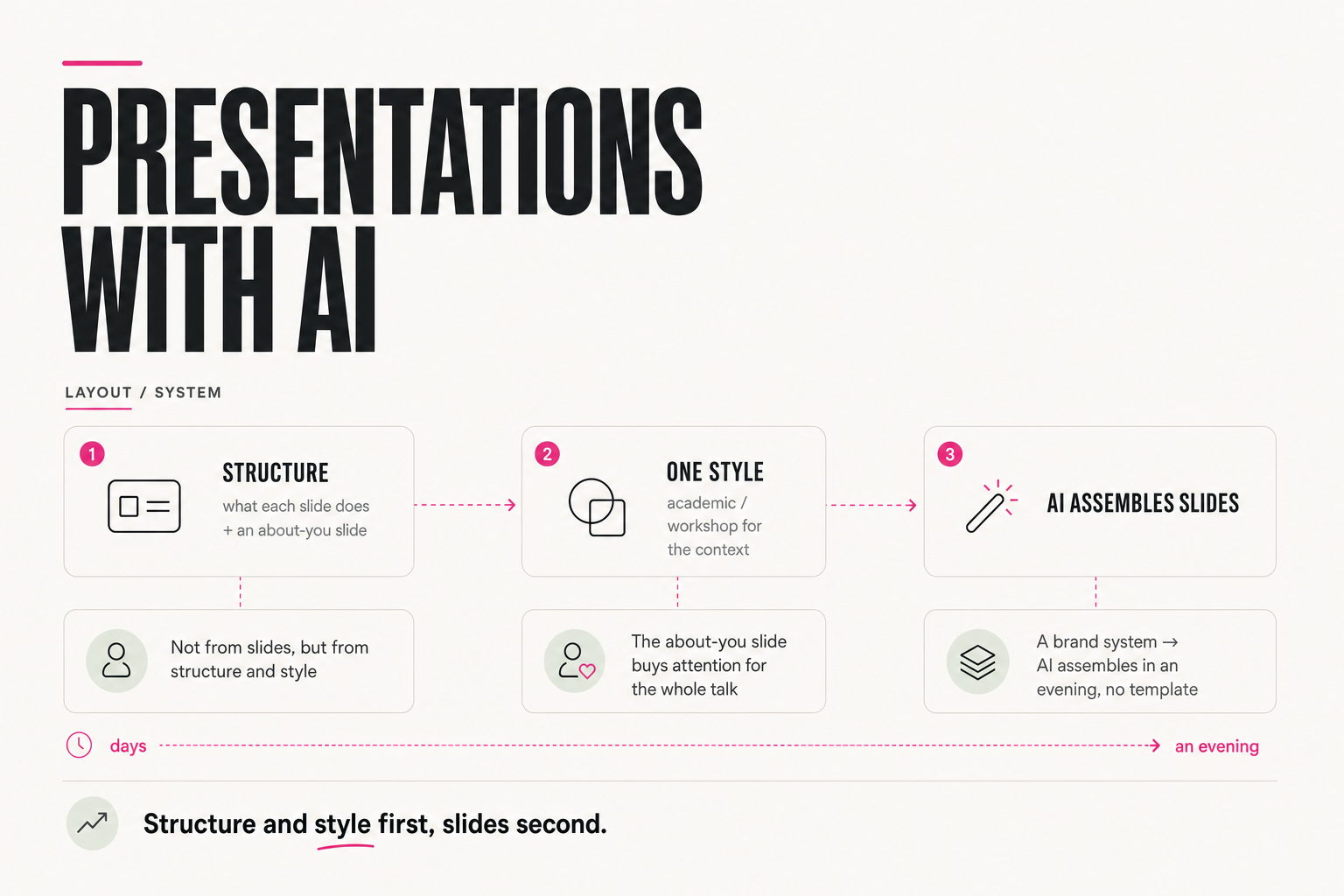
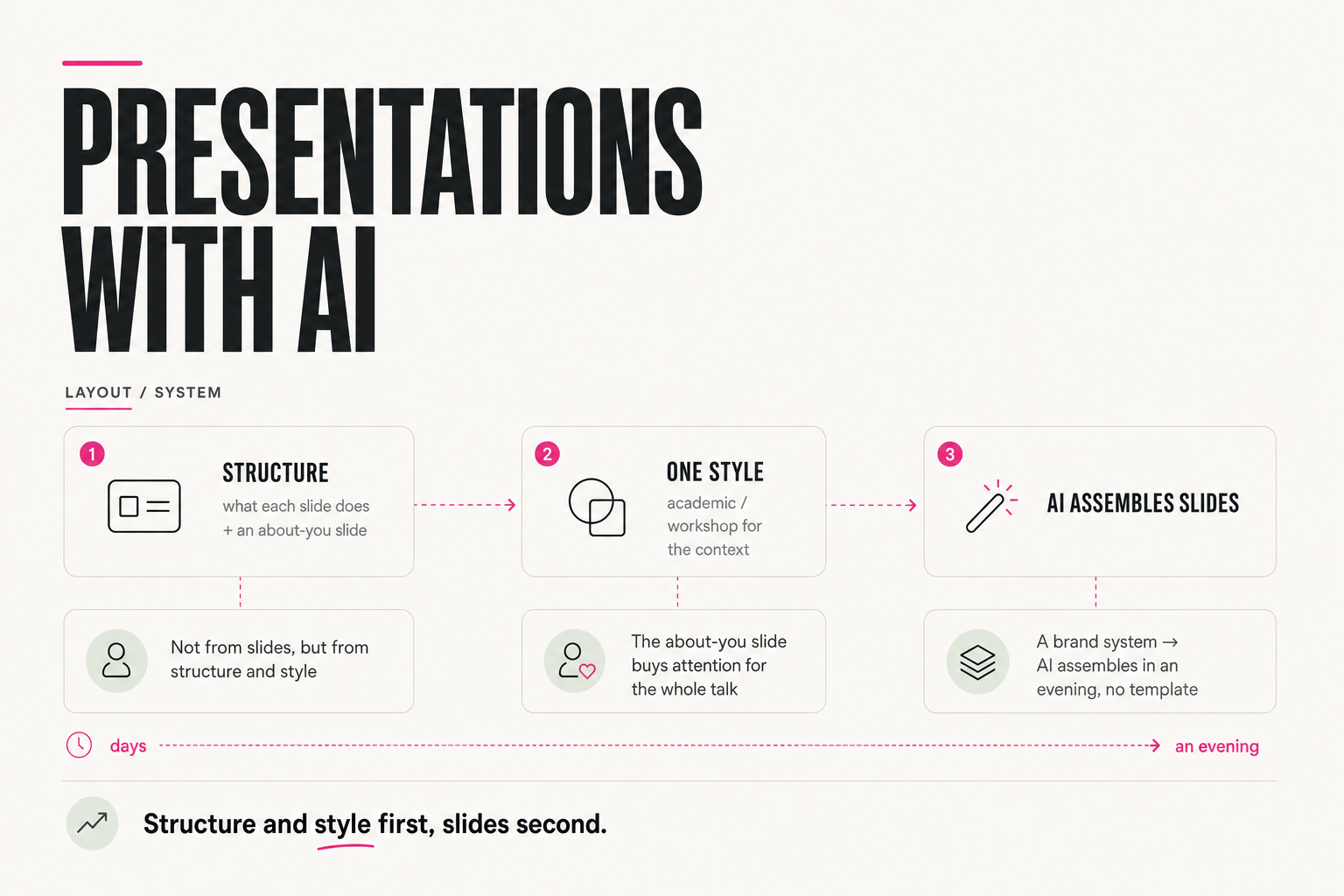
The problem is that both roads start from the wrong end — with slides. A strong presentation starts with structure and style. Once those are set, assembling slides is the mechanical part, and that's exactly what AI takes over.
"Make me 10 pretty slides about X" — AI returns something average, then two hours of fixing colors and fonts.
First what each slide does, then style, then ask AI to assemble. Almost no revisions.
02 — Structure
What comes before the slides?
Before design comes structure: what each slide must do, in what order the thought moves, where the tension is and where the conclusion. A slide isn't "a pretty image with text" — it's one step in the logic of the talk.
One slide that many underrate stands apart — the about-you slide. Before they start listening, the audience decides in a couple of seconds whether what you say is even worth trying. One slide on who you are and why you can be trusted (your project numbers, say) answers that — and from then on they listen differently. It's not vanity but a function: it buys you attention for the whole talk.
Who I am: [1 line, role + what you're known for]
Trust number: [reach/clients/results — a concrete figure]
Why now: [connection to the talk's topic — 1 line]
Do NOT include: a list of every credential — only what's
relevant to this specific talk's topic.
03 — One style
Why is choosing the style the first decision?
Choosing the style is the first decision before you start, and it depends on the context. Roughly, there are two different registers:
Strict, light, authoritative — for formal talks: institutions, conferences, expert presentations.
Lively, high-contrast, with accents — for workshops, lectures, commercial and content talks.
The key is not to mix them and to choose the style before the slides. The same talk in the wrong register falls flat: academic at a workshop looks dull, and flashy on a formal stage looks unserious.
04 — The brand system
How do you keep AI from reinventing the design every time?
The most common mistake is asking AI to "come up with a design" each time. Then it drifts: different fonts, colors and spacing from slide to slide. The fix is not to reinvent the design but to give the model a ready system — palette, typography, components — and assemble slides from it.
Ideally this is part of your brand style, set once. Then any presentation comes together from the same bricks with no fatal mistakes. How to build that system and test a brief across several models is a separate breakdown, "Design with AI"; here one rule matters: the style system first, the slides second.
Palette: [3-4 colors with HEX codes, where to use each]
Typography: [heading font, body font, sizes]
Components: [how quotes, lists, accents, slide numbers are styled]
Use only this — don't add new colors or fonts even if a slide
seems to be "missing something."
05 — Assembly
How does AI assemble slides in an evening?
Once you have structure and style, AI handles the mechanical part. Modern models build presentations in HTML, so you give them the structure (what's on each slide), the chosen style (palette, typography, components) and the content — and you get slides assembled from your system.
1. Structure: what each slide does + an about-you slide (trust)
2. Style: pick the register for the context (academic / workshop)
3. System: palette, typography, components (from the brand style)
4. AI: assemble slides in HTML from structure + style
5. Images: generate them in the style of your references
What used to take days turns into an evening — because you gave AI not "make it pretty" but a clear structure and a ready style.
06 — Where to start
Where do you start your next presentation?
Don't open the slide editor. First, on one page, write the structure: which slide follows which and what it does, not forgetting the about-you slide. Then choose the style for the context. And only with that go to AI — to assemble the slides.
Slide 1: [what it does] Slide 2: [what it does] Slide 3 (about you): […]
... through the final takeaway/CTA slide.
Check: is there logical tension and a release at the end?
Is there an about-you slide? Only then — open AI.A presentation starts not with slides but with structure and style. Define what each slide does, pick one register for the context, give AI a ready brand system — and assembly turns from days into an evening, while the result looks like you.
FAQ
Why does an AI presentation come out templated?
Because it's started from the slides, asking AI to "come up with a design." With no structure and no set style the model drifts and returns the average. Start from the other end: write the structure (what each slide does) and pick one brand style — then AI assembles from your system, not a template.
Why a separate about-you slide?
Before they listen, the audience decides in a couple of seconds whether what you say is worth trying. One slide on who you are and why you can be trusted (project numbers, for instance) answers that and buys you attention for the whole talk. It's not vanity but a trust function.
How do you choose the presentation style?
By context. For formal talks (institutions, conferences, expert presentations) — a strict academic style. For workshops, lectures and commercial talks — a lively workshop style with accents. The key is to choose the style before the slides and not mix registers.
How do you keep AI from reinventing the design each time?
Give it a ready system — palette, typography, components — and assemble slides from it rather than asking it to "come up with" one. Ideally it's part of a brand style set once. Then any presentation comes together from the same bricks with no mistakes; more in the "Design with AI" breakdown.