Design with AI: how to make the model understand the design you actually want
Not Gamma, not templates. My system: one brief tested across several models at once, plus five observations that stop AI from messing up the visuals.

01 — The system
Why test one brief across several models at once?
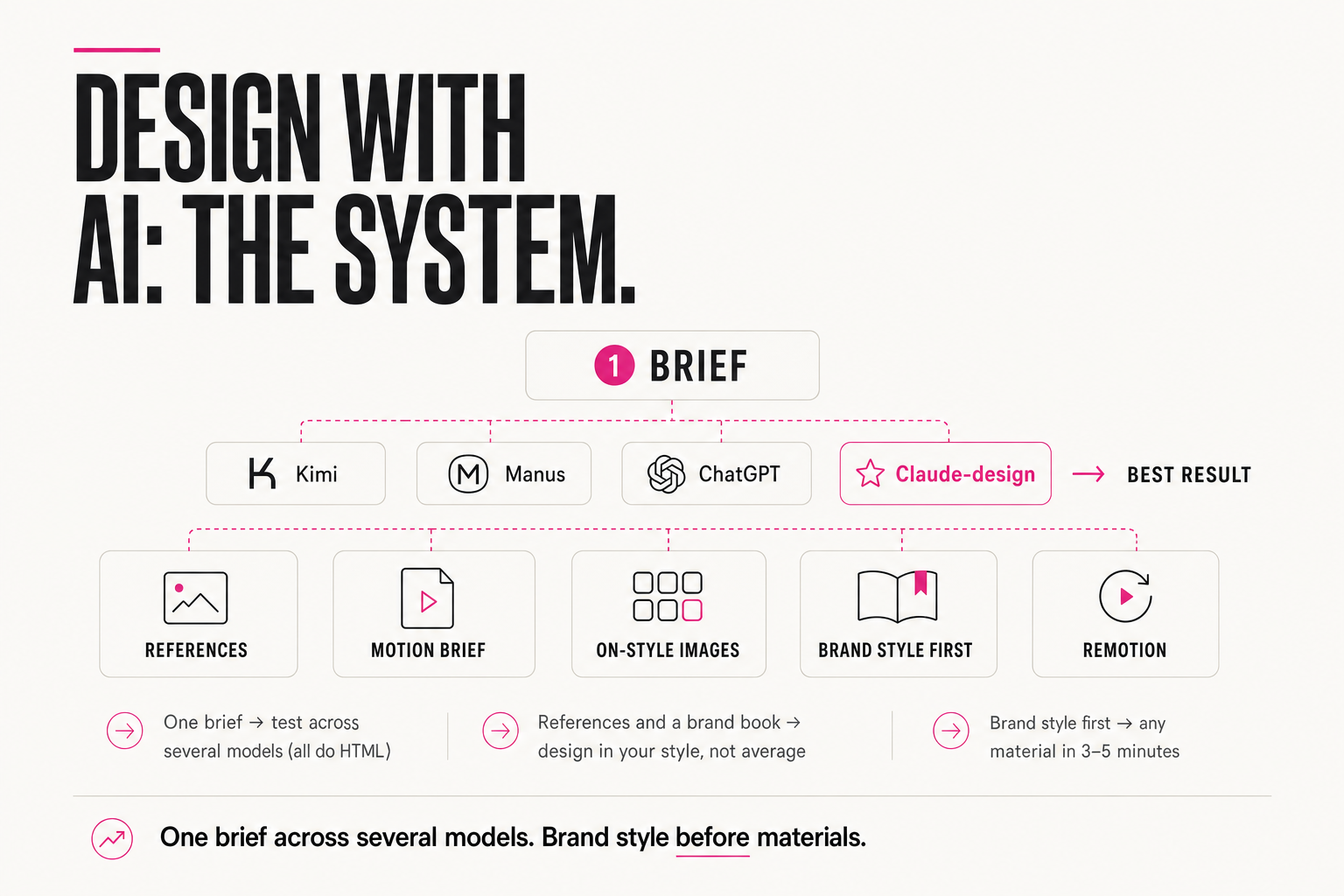
No Gamma here: I'm specific about the design I want, and template generators don't cut it. My system is simpler and stronger — I run the same brief through several models at once, because they can all produce HTML, and compare which one nailed it.
My minimal test base: Kimi, Manus, ChatGPT and Claude (design mode). As of June 2026 the last one is my favorite — it follows my brief noticeably better. But favorites change, so the point isn't one model but testing one brief in parallel and taking the best output.
TASK: a landing page for [product], 1 screen, dark theme
STYLE: see attached references (3 screenshots)
MUST: HTML+CSS in a single file, no external libraries,
  one accent color [#hex], Inter or a similar font
BANNED: "rainbow" gradients, emoji instead of icons, 3D shadows
OUTPUT: if something from the references doesn't fit, say what
  you dropped

→ paste this SAME text into Kimi, Manus, ChatGPT, Claude-design
→ compare the 4 results side by side, take the best or combine details
02 — References
Why does AI produce average design without references?
AI works best when it has examples. Without a reference it returns average design — just like with text: no input, no taste of yours. So the first step is to give examples of what you like.
You can grab them by hand on Behance, Dribbble, Pinterest — or use curated sets. And if you want the agent to search itself, give it hands: refero.design is a library of good designs with an MCP server. My agent goes there itself and requests examples for the task before drawing anything: "find 3–5 references in premium editorial style for a fintech landing page, dark theme" — and then builds the brief off those, not off my words.
AI without a reference averages — just like with text. Give it examples of your taste, and the design stops being "like everyone's."— Anjela Petkova
"Make a nice landing page" → a generic SaaS template with rounded cards and a gradient — the one you've seen a thousand times.
Same words + 3 screenshots in a premium editorial style → the model copies the specific composition, not "something nice in general."
03 — Animations
What if you need animations?
If you want animations, you'll have to explain in great detail — the model won't guess the timings, easing curves and order of element entrances on its own. A detailed motion brief is its own big job that nobody likes doing by hand.
"Add a smooth fade-in for the headline" → the model sets a default 0.3s fade, not what you had in mind.
"Headline: opacity 0→1 over 600ms, ease-out, 200ms delay after load; letters appear one by one, 40ms apart" → you get exactly the timing you saw in the reference.
That's exactly why I built myself a whole motion-design skill: it writes those huge animation briefs, structured like the right column above, and then implements them. Same logic as everywhere in this system — digitize a complex expertise once (here, how to describe motion) so AI does it for you consistently afterward, instead of from scratch every time.
04 — Images
Why is half of design images and video?
About 50% of the impression a design makes is images, photos and video. They're what make a site, a deck or any material feel alive — not the text and the grid. So a separate job is not just laying it out but filling it with visuals in the right style.
My move: I ask ChatGPT to describe the style of the images in my references in words, then generate similar ones for my materials. Their new model works surprisingly well — I've nearly moved off other generators. First pull the style out of the examples, then mass-produce your own images in it — the same "show, don't describe" principle.
Step 1: "Describe the style of these 3 images in one paragraph:
  light, palette, composition, textures, mood — so I could
  generate similar ones"
Step 2: (take that description) "Generate an image in this style:
  [description from step 1] + [new subject for my material]"
05 — Brand first
Where do you start so AI doesn't mess up every material?
The most effective approach is brand style first, individual materials second. Not the other way around. If you re-explain colors, fonts, tone and rules every time, AI drifts from material to material.
I built a full brand book for my personal brand this way — and now any site, deck or project image comes together in 3–5 minutes with no fatal mistakes. The brand book becomes the very context the model pulls everything from: it doesn't have to guess, it checks against it. It's one-time work that then saves hours on every material.
1. Brand book: colors, fonts, tone, rules, 5–10 references
2. One brief → test in Kimi / Manus / ChatGPT / Claude-design
3. References for the agent (Behance/Dribbble/Pinterest or refero MCP)
4. Images: "describe the style of my examples" → generate similar
5. Animations: a detailed brief (or a motion skill) → implementation
06 — Hands for video
How do you let the agent make video and animation?
The last layer is letting the agent not just draw but render video. For that there's Remotion: hand the agent the link, ask it to install everything — and it renders clips, overlays text, animations and the rest itself.
"Here's the Remotion link: github.com/remotion-dev/remotion.
Install it into the project. Now make a 15-second clip:
  the headline [text] appears letter by letter, then 3 cards
  slide in from the bottom 0.3s apart, ending with a logo and CTA.
Export as MP4, 1080×1920 (story format)."
That's the jump from "AI draws a picture" to "AI assembles a finished material end to end." Put it all together — brand book, multi-model test, references, on-style images, motion and rendering — and visual production stops being the bottleneck.
Don't hunt for one "design service." Build a system: brand style first, one brief across several models, references for the agent, on-style images, motion briefs and Remotion for video. Once it's set up, any material is minutes, not days.
FAQ
Why not use Gamma or similar services?
Template generators are fine for a generic result, but if you're specific about the design you want, they don't give control. It's more flexible to work through models that produce HTML from your brief: you can test the same brief in several and take the best result for your taste.
Why test one brief across several models?
Because they can all do HTML but follow a brief differently, and the favorite changes over time. Testing in parallel across Kimi, Manus, ChatGPT and Claude (design mode) lets you pick the best result without locking into one model. As of June 2026, Claude follows the brief most precisely.
How do I get AI to design in my style, not an average one?
Give it references and a brand style. AI without examples averages. Build a brand book (colors, fonts, tone, rules) and a set of references — by hand or via refero.design with MCP so the agent searches itself. Then the model checks against your taste instead of guessing.
Can I have AI handle images and video too?
Yes. Images — ask it to describe the style of your references and generate similar ones (new models do this very well). Video and animation — via Remotion: the agent installs it itself and then renders clips, overlays text and animations. For complex motion, a separate skill that writes detailed briefs helps.