AI agents in plain words: what they are and why you'd want one
No hype, no robots. What separates an agent from a chatbot — and the one shift that makes AI finish work instead of just talking about it.

01 — Definition
What is an AI agent, really?
Strip away the hype and an agent is simple: it's AI you give a goal to, not just a question. A chatbot is a conversation — you ask, it replies, you copy the reply somewhere yourself. An agent is a worker — you hand it an outcome, and it works through the steps to get there.
Same underlying model. The difference is what it's allowed to do with it. And that difference is what turns a clever talker into something that finishes the job.
An everyday example. Ask a chatbot "which emails that came in are important?" and it only answers if you paste the emails in yourself — then you decide what to do next. You tell an agent "go through my inbox and turn the three important ones into tasks for today" — and it reads the mail, picks what matters, and creates the tasks in your list. The first talks about the work. The second does it.
"Compile the sales report" → returns text in the chat, you copy it into the spreadsheet and email the team yourself.
It pulls the numbers from the CRM itself → drops them into the spreadsheet template → sends it to the team channel every Monday.
02 — The shift
What makes an agent different from a chatbot?
Three things turn a chatbot into an agent:
- Tools. It can act through things — read a file, write to a doc, post to a channel — instead of only producing text.
- A destination. The result goes somewhere real, so the work is finished, not pasted.
- Steps. It can break a goal into actions and carry them out, checking as it goes.
Same task — "go through 20 reviews and summarize them for the team":
You paste in the 20 reviews by hand → it returns a summary → you copy it into the team chat yourself.
It reads the reviews from the sheet → summarizes → posts to the team channel → flags 2 borderline ones for your review.
A chatbot generates. An agent completes. That's the whole difference.— Anjela Petkova
03 — Requirements
What does an agent actually need to work?
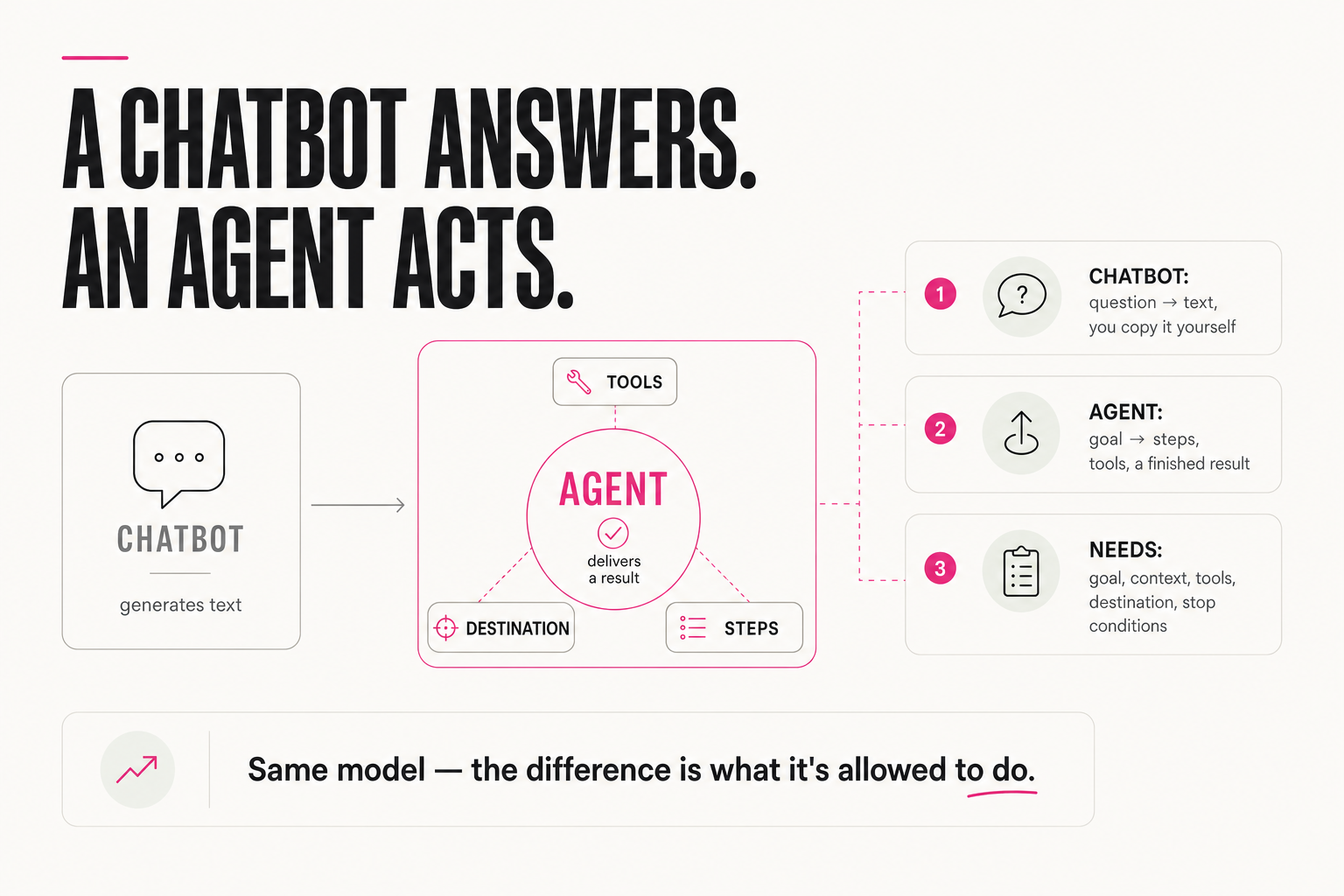
An agent that's useful (and safe) needs five things:
- A goal — the outcome, stated clearly.
- Context — who it's for and what "good" looks like.
- Tools — the apps and data it's allowed to use.
- A destination — where the finished result lands.
- Stop conditions — when to pause and ask a human instead of guessing.
Goal: "answer standard support questions"
Context: friendly-but-informal tone, 5 examples of good replies
Tools: access to the FAQ base and the client's message history
Destination: a draft reply in the ticket system, not a direct send
Stop: a refund, a complaint about rudeness → hand to a humanAn agent isn't a smarter chatbot. It's a chatbot with tools, a destination, and the judgment to know when to ask you.
04 — What to delegate
What can you actually hand an agent today?
An agent earns its keep on boring, repeatable work — not on heroics. The list of what genuinely delegates today is longer than people think:
- audience and competitor analysis
- content plans and reel ideas with hooks
- headlines, offers, sales-page structure
- product and service descriptions
- SOPs, business processes, specs
- draft replies to standard incoming requests
They share one thing: they're frequent and have a clear sense of "good." You open a ready algorithm, the agent takes it and solves the task in 10–15 minutes — no waiting for a live session. That's where the shift from "AI talks about the work" to "AI does it" begins.
05 — Honestly
Why is "an agent in 1 minute" a showroom, not the truth?
Let's be honest about the hype. Headlines like "build an agent in 1 minute," "automate everything" are a magic pill and entertainment for clever people. A beautiful automation looks impressive and is often not effective at all. To make it effective takes hours of business analysis and thinking through every micro-detail of the process — and only then building.
And in 90% of real projects you'll hit the wall where integrations need actual code, and the promise of "magic buttons where it all runs itself" stops working. Meanwhile the popular videos somehow never mention cost, feasibility, or expected metrics.
The takeaway isn't "agents are a scam." It's: an agent is a real worker you configure for a real process, not an ad's button. Metric and process first — agent second.
"An agent that sorts your inbox in 1 minute" — works in a demo with 3 emails, breaks on a real flow of 200.
A week spent mapping the real email flow, categories and exceptions — then the agent handles 90% with no input from you.
06 — Where it breaks
Where do agents most often break?
Let's look at where an agent breaks most often — it's almost always a missing piece from the five above:
- No context → generic. It answers a client in polite but faceless text, not your voice. The fix isn't a smarter model — it's examples and standards.
- No stop condition → acts at the edge. A non-standard case shows up and it decides on its own instead of asking: it issues a refund that shouldn't have happened. One stop rule removes this.
- No destination → the work hangs. The summary is ready but stuck in a chat — nobody sees it, nothing is finished. A destination turns text into a result.
Notice: none of these failures is about a "dumb model." All three are about boundaries you didn't set. An agent is exactly as reliable as the field you clearly draw for it.
Text is faceless, not your voice? → add examples and standards
(missing context)
Agent did something irreversible without asking? → add a stop
condition (missing stop conditions)
Result is ready but nobody saw it? → assign a concrete
destination (missing destination)
07 — Where to start
How do you start without overbuilding?
Don't try to build an autonomous empire. Pick one task you repeat. Give the agent one tool and one destination — read this, produce that, put it there. Add a single stop condition so it calls you when it's unsure.
Goal:        draft a reply to an incoming request
Tool:        read the inbox
Destination: the "Drafts" folder (for your approval)
Stop:        non-standard request or a refund → ask a human
Run it, correct it, and only then add the next tool or step. The teams that win with agents don't start big; they start with one boring, repeatable job and let it earn the next one.
FAQ
Do I need to code to use an agent?
No. Most agents today are built by describing the goal, connecting the tools, and pointing at a destination — all in plain language and a few settings. The skill is defining the task clearly, not programming. (Though complex integrations can still need code — worth knowing honestly.)
Is an agent safe to let loose?
It's as safe as the limits you give it. Define which tools it can use, where results go, and a stop condition for anything uncertain or irreversible. Start with low-stakes tasks and widen its scope only as it earns trust.
What's the smallest useful agent?
One repeatable task, one tool, one destination — for example: read incoming requests, draft a reply in your voice, leave it in your drafts for approval. Small and reliable beats ambitious and brittle every time.
How is an agent different from plain automation?
Plain automation follows a rigid if-then script. An agent gets a goal and chooses the steps for the situation, using tools and checking itself. That makes it more flexible — but it needs context and stop conditions all the more, or it starts guessing.