Make ChatGPT write in your voice — without 100 prompts
Pasting your style into every request is the wrong fix. Here's how one project with real examples gets the model to sound like you.

01 — The problem
Why does ChatGPT sound nothing like you?
Out of the box, the model writes in the voice of the internet's average — smooth, safe, faintly corporate. It has read billions of pages and none of them are yours. So it gives you the most likely sentence, not the one you'd actually write.
Ask for a post and you get "In today's fast-paced world, speed is everything." Not one living word. Your voice is made of specifics: the way you open, your rhythm, the words you'd never use, where you put a joke. None of that is in the model until you put it there.
Take the last AI-written text and ask yourself:
1) Could anyone in my niche have written this?
2) Is there even one detail here only I would know?
3) Is the opening mine, or "in today's world..."?
2+ "anyone could" answers? That's the internet's voice —
time to feed examples into a project (section 03).
02 — The wrong fix
Why doesn't pasting your style into every prompt work?
So you start each chat with "write like me: bold, direct, a bit ironic." Two problems. First, you're describing your voice, and descriptions are vague — "bold" means a hundred things. Second, you have to do it every single time, and you'll do it slightly differently every time, so the output is never consistent.
You can't define a voice in adjectives. You can only show it.
The model learns your voice from your sentences, not from your adjectives.— Anjela Petkova
Ask three people what "bold" means to them in writing.
You'll usually get three different answers: short sentences,
provocation, blunt numbers with no softening.
If people interpret the word differently, the model will too.
So the adjective doesn't define the voice — a sample does.
03 — The fix
How does one project fix it?
A project (or a custom GPT) is a workspace where instructions and files stick around. That changes everything: instead of describing your voice, you attach it.
I've long written posts in Claude inside a single chat — so it keeps the context above and holds my style. The same mechanic works in ChatGPT, just through a project:
- Create a new project (top left). In settings, turn on project-only memory — so the model doesn't pull style from your other chats.
- Add three to five real pieces you've written and are proud of.
- Add a short note: who you write for, and two or three rules of your voice ("short sentences," "no buzzwords," "always a concrete example").
- Ask for new writing inside that project.
I write for: [your audience, 1 line].
Voice rules: short sentences; no buzzwords; always one concrete
example instead of generalities; [add your own].
Match the voice in the attached files, not generic post style.Don't tell the model your style a hundred times. Show it once — with real examples in a project it remembers.
04 — Show, don't describe
How much stronger is showing examples than describing in words?
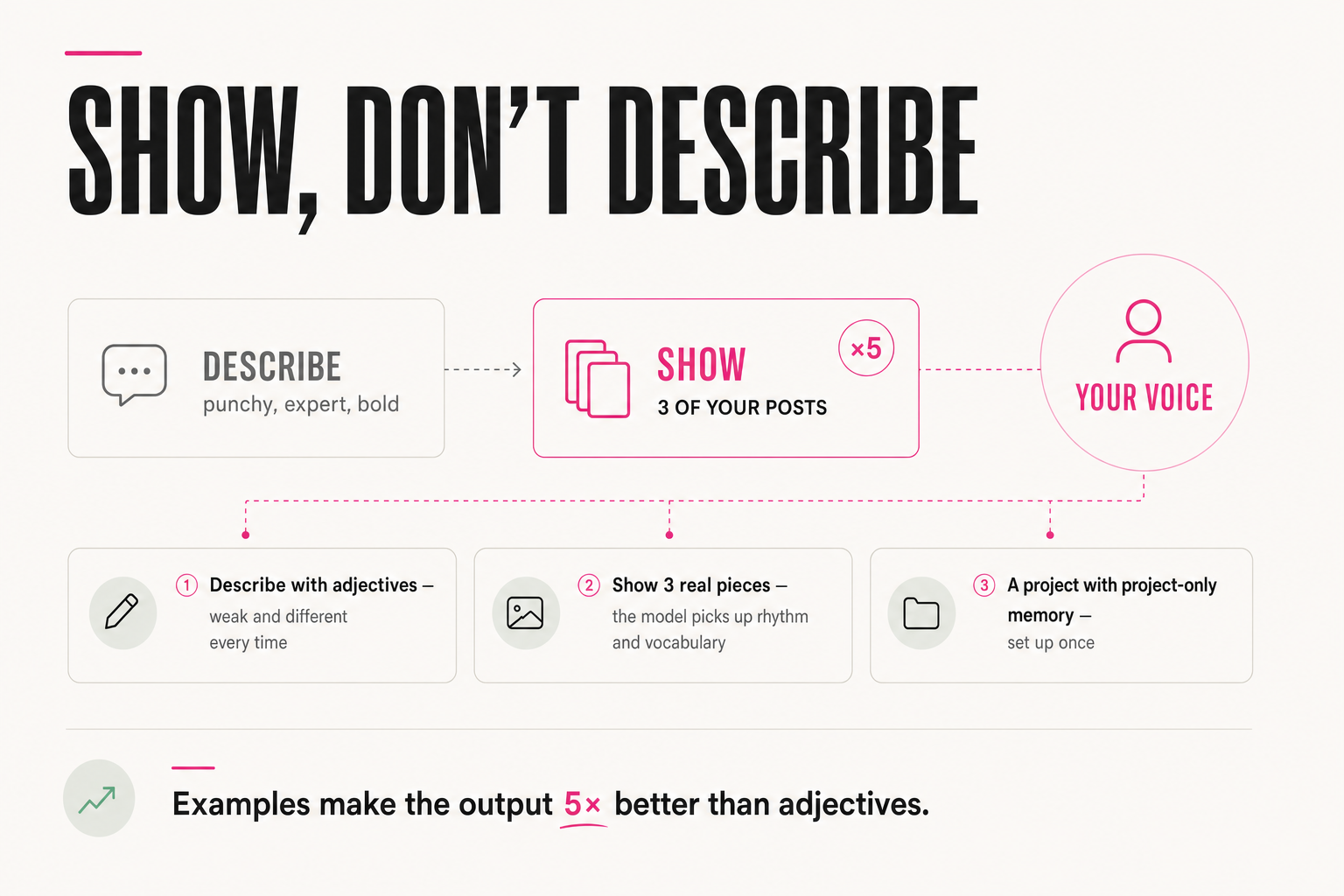
Describing your style is the weakest form. Examples are the strongest, and the gap is measurable. One agency owner who tested this found that adding examples when setting a task made the output roughly five times better. Same model, same task — the only change was real samples instead of a description.
"Write in a bold, witty, expert voice."
"Here are 3 of my posts. Match this voice, structure and level of specificity." (attach the 3 posts)
The adjective "punchy" reads differently for everyone — for you and for the model. Three of your posts leave no room for interpretation: here's the rhythm, here's the vocabulary, here's how you open. Showing removes the guesswork.
Here's what that changes in the output. Same request — "open a post about deadlines":
"In today's world, the ability to meet deadlines is a key skill of any successful professional."
"A deadline isn't about discipline. It's about how many decisions you made in advance."
On the left, the internet's voice: correct and dead. On the right, a turn, a rhythm, a point of view. What created the difference wasn't a better prompt — it was three of your pieces sitting in the project.
05 — Setup
How do you set it up in ten minutes?
Create a new project. Turn on project-only memory. Paste a short voice note as the instructions. Attach your example pieces as files. Write your first request — then correct the result once or twice, adding any rule you wish it had followed. That's it.
1. New project → Settings → project-only memory ON
2. Instructions (3–5 lines): who I write for + voice rules
3. Files: 3–5 of my best pieces
4. First request → fix the output → add the missing rule
From then on, every draft starts in your voice instead of the internet's. You stop fighting the model for tone and start editing actual ideas — which is where your time should have gone all along.
06 — Hidden material
What else should you drop into the project besides posts?
Call transcripts. On a call you explain your thinking more alive than you write it — real words, real examples, your order of revealing things. That's premium voice material already sitting in your recordings.
One product marketer did exactly this: she fed in transcripts of her customer-research calls and pulled about 30 lead-magnet ideas in 20 minutes, using the AI as a buddy to riff with. The ideas were good because the input was hers — real customer language, not generic brainstorming.
Drop in a transcript where you explain something out loud, and the model picks up not just the topics but your way of walking into an idea.
Here's a call transcript where I explain [topic]: [paste it].
Pull out: 1) my verbatim phrasing and examples (not a summary),
2) the order I reveal the idea in,
3) 5-10 post/lead-magnet ideas based on this.
Keep my words — don't smooth them into "generic text."
07 — Compounding
Why does it only get better from here?
The project isn't static. Every time you praise a good piece, fix a weak one, or drop in a strong new post, the context thickens — and over time the model writes ever closer to your voice.
That's the difference from a prompt: you rewrite a prompt every time, but a project remembers. You invest once and tune a little at a time — and the payoff grows every month, without a single longer request. You end up not with a tool you re-explain yourself to each time, but a workspace that already knows.
Once a week, 5 minutes:
1) Found a strong piece (yours or edited)? → add it to the
project's files.
2) Did the model miss your voice? → add the rule it broke to
the instructions, in one line.
3) Remove any example that no longer reflects your style.
FAQ
How many writing samples should I add?
Three to five strong pieces in the format you care about. The model picks up rhythm, vocabulary and structure from real text far better than from any description. Add more only if you write in clearly different formats.
Custom GPT or a project — which one?
Either works; both keep instructions and files between chats. Use a custom GPT if you want to reuse and share it, a project if it's just for your own ongoing work. The principle is the same: persistent context, real examples.
Why turn on project-only memory?
So the model takes its style from your examples instead of pulling context from all your other chats. Without it, your voice gets mixed with whatever else you've typed and the output drifts. It's one toggle in the project settings, but it's the key one.
Will it copy my samples word for word?
No — it learns the pattern, not the text. You're teaching it your voice, not asking it to plagiarize. If it ever leans too close to a sample, tell it to keep the voice but change the content, and it will.